How to Access WebHealth Network Inventory in The Trade Desk
Inventory
HCP Inventory |
Healthcare Professional Inventory is purchased based on over 100 Disease States and Specific Specialties (NPI List). Normally, we will request the NPI list to ensure efficiency and best performance. Most of this inventory can be found at WebHealthNetwork.com |
Consumer Inventory |
Consumer Inventory is matched to User Interest based on Keywords and In Page Browsing Patterns. Meaning, Inventory is Grouped by Specific Health Topics on our WebHealth Network’s Consumer sites. Please Note Consumer Inventory is normally purchased with 1Party Data. |
How to Buy Inventory |
How to Buy WebHealth Network Inventory in The Trade Desk.
|
How to Access WebHealth Network Inventory in The Trade Desk
Off the Shelf Data
HCP Off the Shelf Data |
HCP Inventory is available Off the Shelf by Healthcare Specialty. |
Consumer Off the Shelf Data |
Consumer Data is matched to User Interest based on Keywords and In Page Browsing Patterns. A wide list of Off the Shelf Data segments can be found via the “Build Audience” in the Trade Desk Platform. |
How to Buy Off the Shelf Data |
The Trade Desk: Available via the Audience Builder for all buyers.
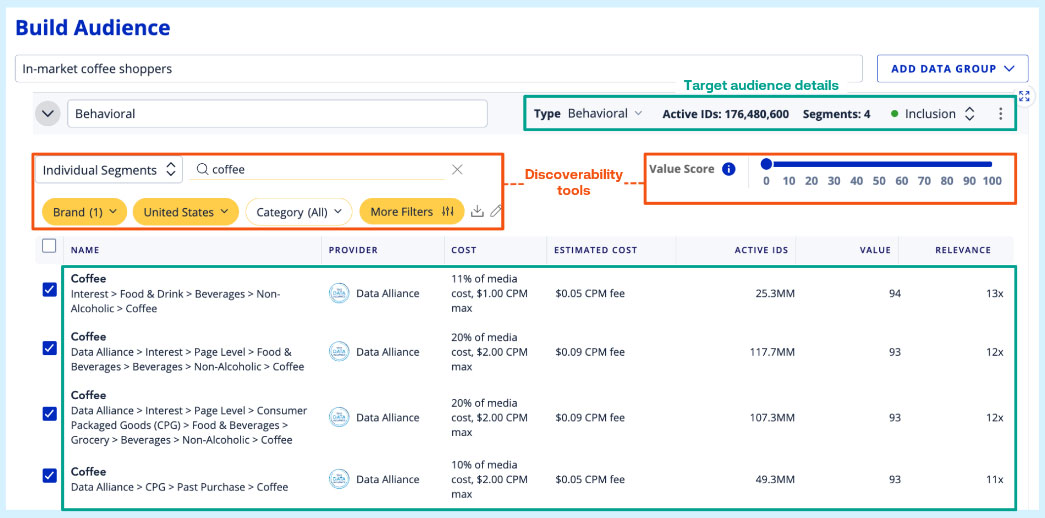 |
How to Access WebHealth Network Inventory in The Trade Desk
Custom Data
HCP or Consumer Custom Data |
HCP Data by an NPI List Match can be built within 5-7 business days and made available via the “Audience Builder” within the Trade Desk.
|
How to Buy Custom Data |
The Trade Desk:
|